










Summary
Rep-triggered automations are CRM workflows that start when a sales rep takes a deliberate action, like checking a checkbox in Salesforce, rather than firing automatically from a system rule. They’re ideal for handoffs, reroutes, enrichment requests, and other processes where human judgment determines the right moment to act.
Why Not Every CRM Automation Should Run in the Background
Most CRM automations run in the background. A lead fills out a form, a field updates, a score hits a threshold and the system takes over.
hat model works well for high-volume, repeatable processes like MQL routing or round-robin assignment.
But not every workflow should be fully automatic.
Sales reps, SDR managers, and customer success teams constantly run into moments where they know exactly what needs to happen next, but the system isn’t built to respond to that judgment call.
The lead needs to be rerouted. The deal is ready for onboarding. A record needs enrichment before the next conversation. In each of these cases, the rep has the context, what’s missing is a structured way for them to act on it.
That’s where rep-triggered automations come in: CRM workflows that start when a person takes a deliberate action inside Salesforce, like checking a box or updating a field, and then execute a predefined process behind the scenes.
It’s a simple pattern, but it solves a real operational gap between fully manual work and fully automated flows.
How Rep-Triggered Automations Work in Salesforce
The mechanics are straightforward. You add a checkbox field to your Salesforce object, something clearly labeled like “Send to Onboarding” or “Request Reroute.” When a rep checks that box, your automation platform detects the field change and kicks off a workflow.
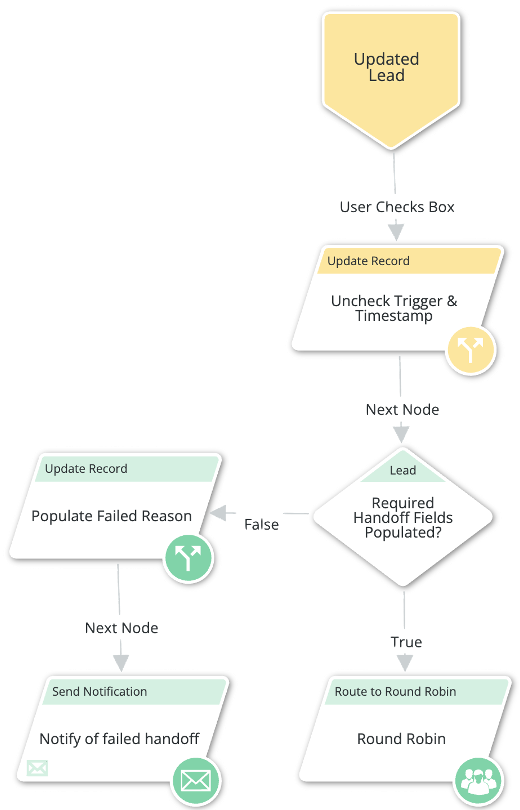
In LeanData’s FlowBuilder, that workflow can include any combination of steps: validating that required fields are filled in, stamping the record with a timestamp and the initiating user’s name, sending notifications to the right people, assigning the record to a new owner, and unchecking the box so the process is ready to be used again.
The key difference from standard Salesforce Flows or Process Builder automations is that these workflows are designed around human judgment as the trigger, not a system event. The rep decides when the moment is right. The automation handles everything that comes after.

4 Rep-Triggered Workflows That LeanData Customers Actually Use
These aren’t hypothetical. Each of the following workflows is running in production at LeanData customer organizations today.
1. Sales Manager Reroute
At one enterprise technology company, the LeanData admin built a workflow that lets reps flag a record for manager review. When a rep checks a “Request Manager Reroute” checkbox, LeanData picks up the record and routes it through a dedicated path that bypasses the normal qualification steps.
The workflow stamps the routing source on the record, reassigns the lead based on the manager’s logic, and runs at a lower priority than standard MQL routing so it doesn’t slow down time-sensitive inbound flows.
This replaced what used to be a Slack message to a manager followed by a manual Salesforce update, a process that could take hours and had no audit trail.
2. Customer Onboarding Handoff
Another LeanData customer uses a checkbox labeled “Handoff to CSM” on opportunity records. When a sales rep checks the box, the automation first validates that all required fields are complete: contract value, product details, customer contact information, and onboarding requirements.
If anything is missing, the workflow updates a reason field on the record explaining what’s needed and routes it back to the rep. If validation passes, the record is assigned to the appropriate onboarding manager and a notification is sent.
This eliminated the back-and-forth emails that used to delay handoffs by days and ensures that customer success teams receive complete records every time.
3. On-Demand Enrichment
Not all enrichment should happen automatically. One LeanData customer added a checkbox that lets reps decide when to enrich a lead, useful when a rep is about to make an outbound call and wants fresh data, but doesn’t want every record in the database getting enriched indiscriminately.
When the box is checked, the record is routed to an enrichment path, populated with updated data, and returned to the rep. The rep gets current information exactly when they need it, and the company avoids burning enrichment credits on records that may never be worked.
4. Disqualification and Nurture
Disqualifying a lead shouldn’t mean it disappears. One LeanData customer built a “Disqualify and Nurture”
checkbox workflow. When a rep checks the box, the automation updates the lead status, adds the record to an appropriate nurture campaign in their marketing automation platform, and removes the current owner assignment.
The CRM stays clean because disqualified leads don’t sit in rep queues. Marketing continues engaging the lead. And if that lead re-engages down the line, normal routing picks it back up with full context intact.
When to Use User-Initiated Automations (and When Not To)
This pattern works best when human judgment is an essential part of the decision.
If a rep needs to evaluate context, assess timing, or apply knowledge that isn’t captured in a CRM field before a workflow should run, a rep-triggered automation is the right fit.
Good use cases include:
- Onboarding handoffs
- Lead escalations
- Manager reroutes
- Selective enrichment
- Disqualification flows
It’s the wrong pattern for high-volume, rules-based processes where every record should follow the same path without exception.
MQL routing, round-robin lead distribution, and inbound form routing should remain fully automated , adding a manual trigger to those processes would only slow down your speed to lead.
The two models complement each other. Fully automated workflows handle the volume. Rep-triggered workflows handle the exceptions and judgment calls.
5 Best Practices for Building Rep-Triggered Workflows
- Use clear, specific field labels. “Handoff to CSM” is actionable. “Trigger Process” is not. Every rep who sees the checkbox should immediately understand what checking it will do.
- Validate required fields before continuing. Use decision nodes to check for critical data before the automation proceeds. If something is missing, update a reason field and route the record back to the rep with clear instructions. This prevents incomplete records from reaching downstream teams.
- Always uncheck the box at the end of the flow. Include an update step that resets the checkbox to false so the process can be reused on the same record. Without this, a rep can only trigger the automation once per record.
- Stamp every record with a timestamp and initiating user. This creates a clear audit trail for reporting and troubleshooting. You’ll be able to answer questions like “who initiated this reroute and when?” without digging through activity logs.
- Monitor usage with routing insights. Track how often each rep-triggered path fires, where records get stuck, and which validation checks are failing most frequently. This data helps you refine the workflows and identify training opportunities.
Bringing Human Judgment Into Your Automation Strategy
The most effective orchestration strategies don’t try to automate everything. They automate the repeatable, high-volume processes and then give reps structured tools to handle the rest.
Rep-triggered automations bridge that gap. They’re fast to build, easy for reps to use, and they replace the informal workarounds: Slack messages, manual field updates, and emailed requests that create delays and leave no audit trail.
If you’re already using LeanData for inbound routing, adding rep-triggered workflows to your FlowBuilder graphs is a natural next step. And if you’re evaluating orchestration platforms, this is a good litmus test: can the tool handle both system-triggered and human-triggered workflows in the same visual builder?
The best automation isn’t the one that removes people from the process. It’s the one that lets people start the right process at the right moment.
System-Triggered, Human-Led, or AI-Driven
See How LeanData Orchestrates Every GTM Action
FAQ
What is a rep-triggered automation in Salesforce?
When should you use rep-triggered automations instead of fully automated workflows?
How do you build a checkbox-triggered workflow in Salesforce?
What are common examples of rep-triggered CRM automations?
Can AI agents replace rep-triggered automations?

Kim Peterson
Kim Peterson is the Senior Manager of Content Strategy at LeanData where she digs deep into all aspects of go-to-market strategy and execution. Kim's writing experiences span tech companies, stunt blogging, education, and the real estate industry. Connect with Kim on LinkedIn.