














Summary
The LeanData MCP lets admins manage round robin pools, ask routing questions, and handle meetings from the AI tools they already use. This article follows one ops leader through a day of requests to show what changes when LeanData meets you in Claude or ChatGPT.
What You’ll Learn
- How a day of ops requests looks when LeanData lives inside your AI tool
- Which Orchestration and Scheduling tasks you can hand to Claude or ChatGPT
- How the tool explains why a lead routed where it did, checks whether a pool is fair, and helps a new analyst learn how your graphs work
- How sign in and LeanData access keep each change under your control
- How permissions work, and where you can find the LeanData MCP
Your team already works in AI tools
People are spending more and more of their workday in tools like Claude and ChatGPT every month. That’s exactly why we built the LeanData MCP, to ensure the work gets done on your terms. Requests that once took several steps in LeanData can now start as a natural language prompt.
Currently in beta and part of LeanData’s Q4 2026 release, the LeanData MCP includes capabilities for both Orchestration and Scheduling. You can manage everything from complex round robin pools, ask questions to understand audit logs, get answers about how your graphs and features work, and manage the full meeting lifecycle. Your AI tool does the reasoning, and LeanData supplies the connection and the guardrails. Let’s look at how it can change one day for one ops leader.
How the LeanData MCP changes your day
9 a.m., a rep gives notice
You’re an ops lead and LeanData admin, and you sit down on Monday morning ready to start the big project of the quarter: rolling out a new agent that helps reps close deals faster. Then a sales manager stops by your desk. A rep just gave notice, and Friday is their last day. It’s Q4, leads are coming in quickly, and the change needs to happen today.
Which round robin pools is that rep in? What accounts do they cover? You hope the documentation is current. Then you open each pool and make the same edit again and again. That one request can eat the whole morning.
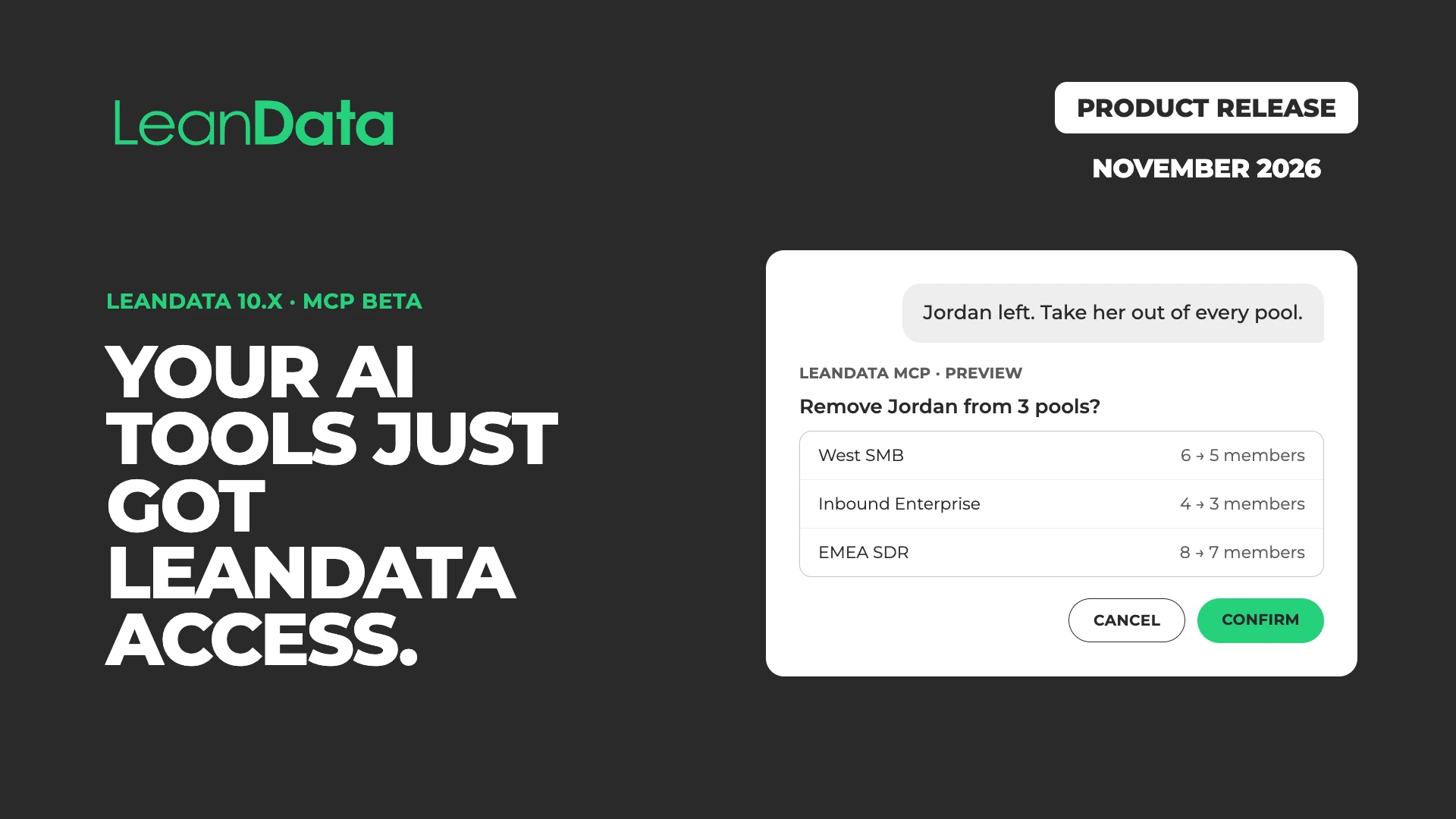
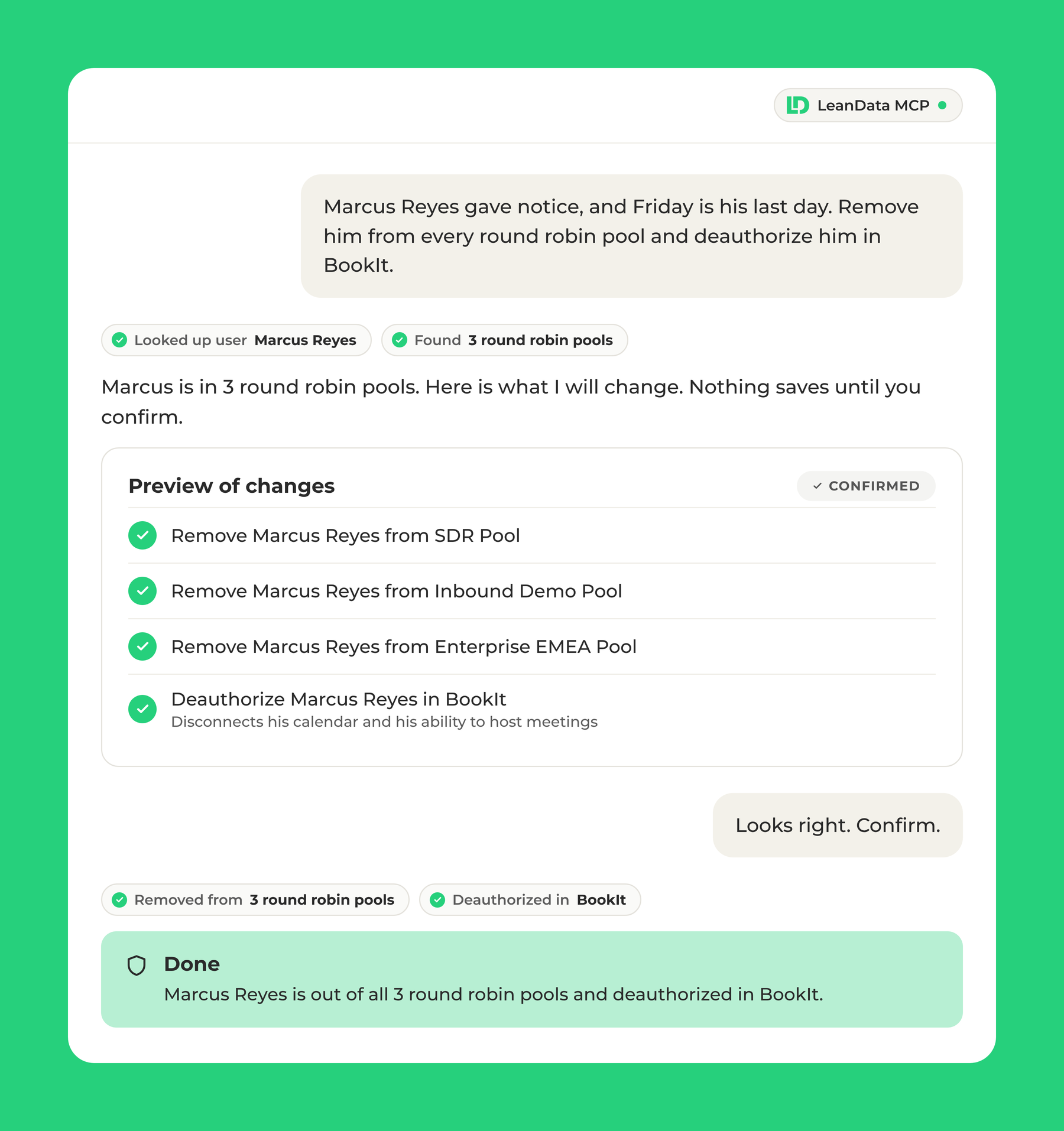
With the LeanData MCP, you ask Claude instead. First, it finds every pool the rep belongs to. Next, Claude shows a preview of every pool that will change and who’s next up, then removes the rep from all of them once you confirm. You can also deauthorize the rep from BookIt in the same conversation. As a result, the change lands in every pool it should, and you finish the task while your coffee is still hot.
11 a.m., a rep is out unexpectedly
Just when you think you can move on to your planned work for the day, the sales manager is back. Another rep is out this week, and they shouldn’t receive leads or meetings while they’re away. The LeanData MCP handles this one too, across both Scheduling and Orchestration.
You ask Claude to set a vacation, and it prepares to take the rep out of rotation in every Routing and BookIt pool until their return date. Then you can review the proposed changes and confirm. If another step needs to happen first, the LeanData MCP is designed to guide you through each step until you can complete the required task. If the rep already has meetings on their calendar for the week, you can reassign them on the rep’s behalf using the BookIt tools in the LeanData MCP. When the rep returns, you can put them back in rotation or give them their turn back with a credit.
1 p.m., two questions in Slack
Thanks to the LeanData MCP, you took a real lunch break. You come back to two new Slack messages. An SDR thinks the round robin pool isn’t splitting leads fairly. Meanwhile, an AE also wants to know why a lead from their account went to someone else.
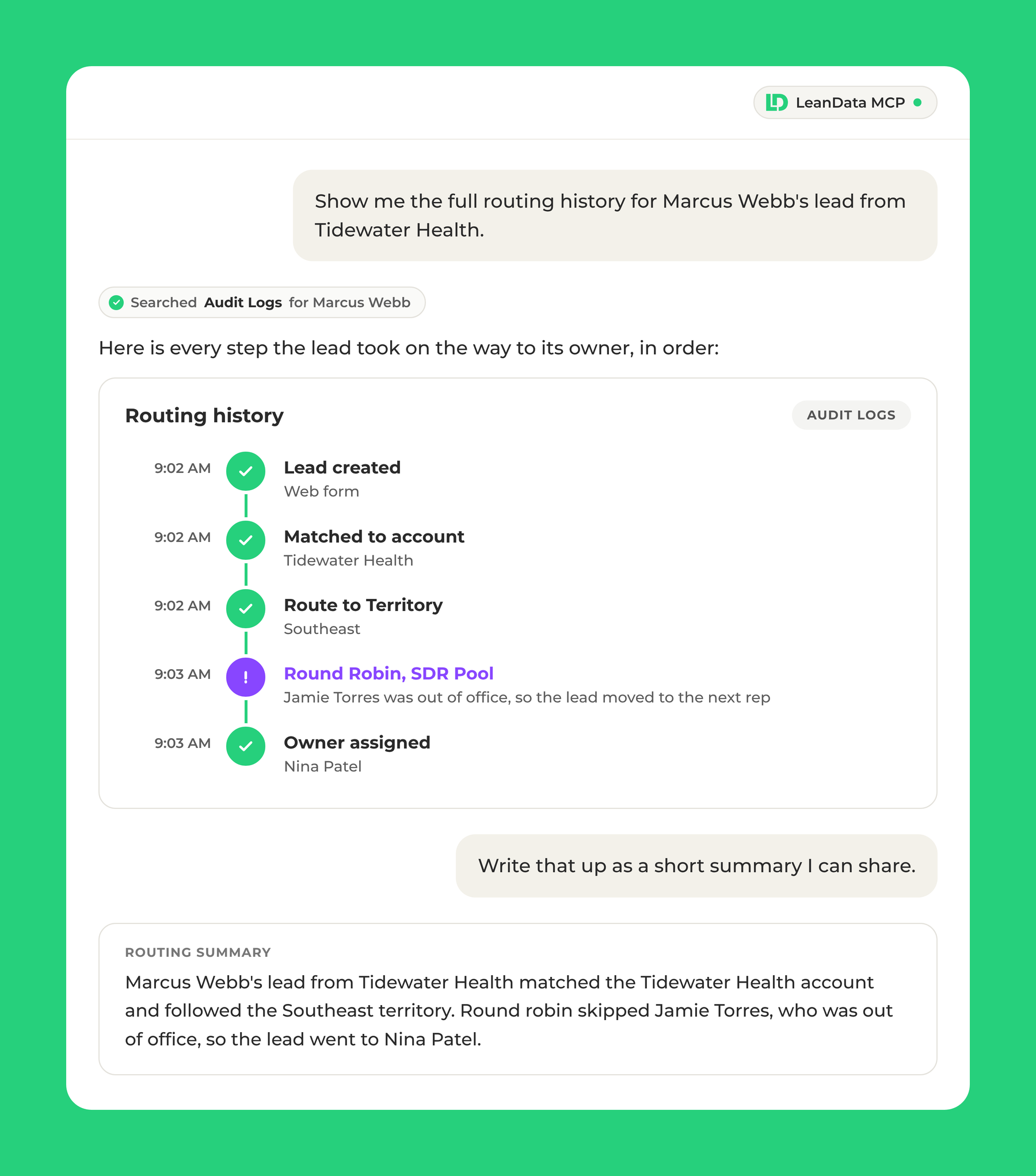
For the SDR, you ask Claude whether round robin is splitting leads evenly across the SDR pool this month. Within a minute, you know whether the SDR has a point. If the pool leans toward one rep, you see it in the numbers and can fix it before the next complaint lands in Slack. For the AE, ask Claude why that lead routed where it did. It returns the path the record took and the step that sent it there, straight from your audit logs, in plain language. Then ask for a written summary you can share with the rep. You’ve answered faster, and the rep gets a summary they can easily understand without extra back and forth.
Beyond a single lead, the LeanData MCP helps you get ahead of the next lead routing question before it reaches you:
- History: Ask for the full routing history of any lead, account, or record that was routed. Claude lists each step the record took on the way to its owner, so you can see exactly what happened and why.
- Failures: Ask how many leads failed to route this week, and why. Then you can fix the rule or field that needs attention before it turns into a pile of misrouted leads and a string of questions in Slack.
2 p.m., a new analyst gets up to speed
Between requests, you remember that a new analyst joined your team this week and needs to learn how your routing works. Normally that means a graph walkthrough, a stack of Help Center tabs, and at least an hour of your afternoon. Instead, you ask the analyst to book time with you tomorrow for a full walkthrough. In the meantime, you point them to the LeanData MCP, and they sign in with their own Salesforce access.
First, they ask Claude, “Explain how our inbound lead graph decides who gets a lead.” Claude explains the graph’s logic step by step and names where each path assigns the record, so the analyst sees how a lead moves from entry to owner. Next, they ask, “How does time-based capping work?” Claude answers from the LeanData Help Center and links the article, so they can keep reading on their own. As a result, the analyst walks into tomorrow’s meeting prepared, and your walkthrough can go straight to the questions that matter.
4 p.m., reporting for leadership
You’re about to wrap up when a sales leader asks how meeting bookings and availability for the month are trending ahead of tomorrow’s GTM leadership call. Pulling that together would normally mean exporting meeting data, building a report, and double checking the numbers, all while the clock runs toward the end of your day. You can already picture the evening it would cost you. Now it takes a few minutes. Ask two questions in the same conversation:
- “How do inbound demo request meetings this month compare to last month?”
- “What is the availability in the SDR pool for discovery calls heading into the end of the quarter?”
As the numbers come back, Claude analyzes the meeting metrics and builds a visual report you can share with the sales leader. As a result, you head into the evening with a finished report instead of a half built one. Tomorrow, the sales leader walks into the leadership meeting with a clear view of how demo meetings are trending and where the SDR pool has room before the quarter ends.
Your permissions come with you into your AI tool
Whenever an AI tool touches your routing and meetings, one question comes up first: who can do what? With the LeanData MCP, the answer comes from the access your team already has in Salesforce and LeanData.
Your access decides what you can do
Each user signs in with Salesforce from their own AI client, so the LeanData MCP acts as that person, with that person’s LeanData access. People see only the tools their access allows. An admin installs the LeanData MCP through the LeanData Connection package in Salesforce and chooses who can connect.
How to get started with the LeanData MCP
The LeanData MCP is available to Premium Orchestration customers on 10.x. You can find the LeanData MCP in the OpenAI, Anthropic, and Outreach marketplaces. Visit the setup guide to get started.
What changes when ops work starts in your AI tool
The LeanData MCP changes where ops work happens. Requests that once meant opening several screens now start in Claude or any other AI tool your team already uses, so answers arrive faster. Meanwhile, permissions keep each change under your control. As a result, ops teams spend less of the day on routine updates and more of it on the project they sat down to finish.
 “Adding more AI agents is easy. Getting them to follow the same rules as your best ops person is the hard part. LeanData MCP solves that. Ops teams can work in LeanData straight from Claude or ChatGPT, and every action plays by the rules they’ve already set. More than 1,000 companies run their business on LeanData. Now their AI does, too.”
 Katy Keim


The LeanData MCP is one part of LeanData’s investment in AI. The AI Assistant explains and edits your graphs inside FlowBuilder, which makes it the place to change one, and the AI Inference Node brings your own AI provider into routing decisions. Run by LeanData, the agentic solution for GTM Ops, is in early access and helps ops teams spend less time fixing and more time building.
Get your Monday back with the LeanData MCP
FAQ
What is the LeanData MCP?
What can admins do with the LeanData MCP today?
How does the LeanData MCP keep changes under my control?
How do the LeanData MCP and the AI Assistant in FlowBuilder work together?

Sarah Kublanow
Sarah Kublanow is a Senior Solutions & Product Marketing Manager at LeanData. She helps revenue teams see how LeanData’s products and solutions tie back to the business outcomes they care about at every stage of the customer journey. Connect with Sarah on LinkedIn.