









The Text Your Routing Rules Can’t Read
Routing automation is typically limited to structured field values, but most of the intelligence your revenue team needs lives in free-text fields (e.g., form submissions, call notes, closed-lost reasons).
The LeanData AI Inference Node brings large language model (LLM) inference directly into your FlowBuilder graph, enabling ops teams to classify, normalize, and score records based on probabilistic reasoning. The result is AI GTM orchestration with faster routing, cleaner data, and competitive intelligence that was previously invisible to automation.
Key Takeaways for the AI Inference Node
- Read and classify free-text fields across Salesforce objects, turning them into usable AI GTM routing signals without manual triage.
- Route records based on AI-generated outputs such as intent category, sentiment, lead score, and competitor mentions.
- Normalize messy or incomplete data before it reaches your matching and routing logic.
- Leverage the LLM of your choice (OpenAI or Google Gemini) via your own API key, so your AI GTM stack works with the model you already trust.
- Build, test, and validate AI inference logic directly within FlowBuilder, the same graph that runs your AI GTM orchestration today.
How it Works
STEP
1. Authorize Your AI Provider
2. Enable the Node
3. Add the Node to a Graph
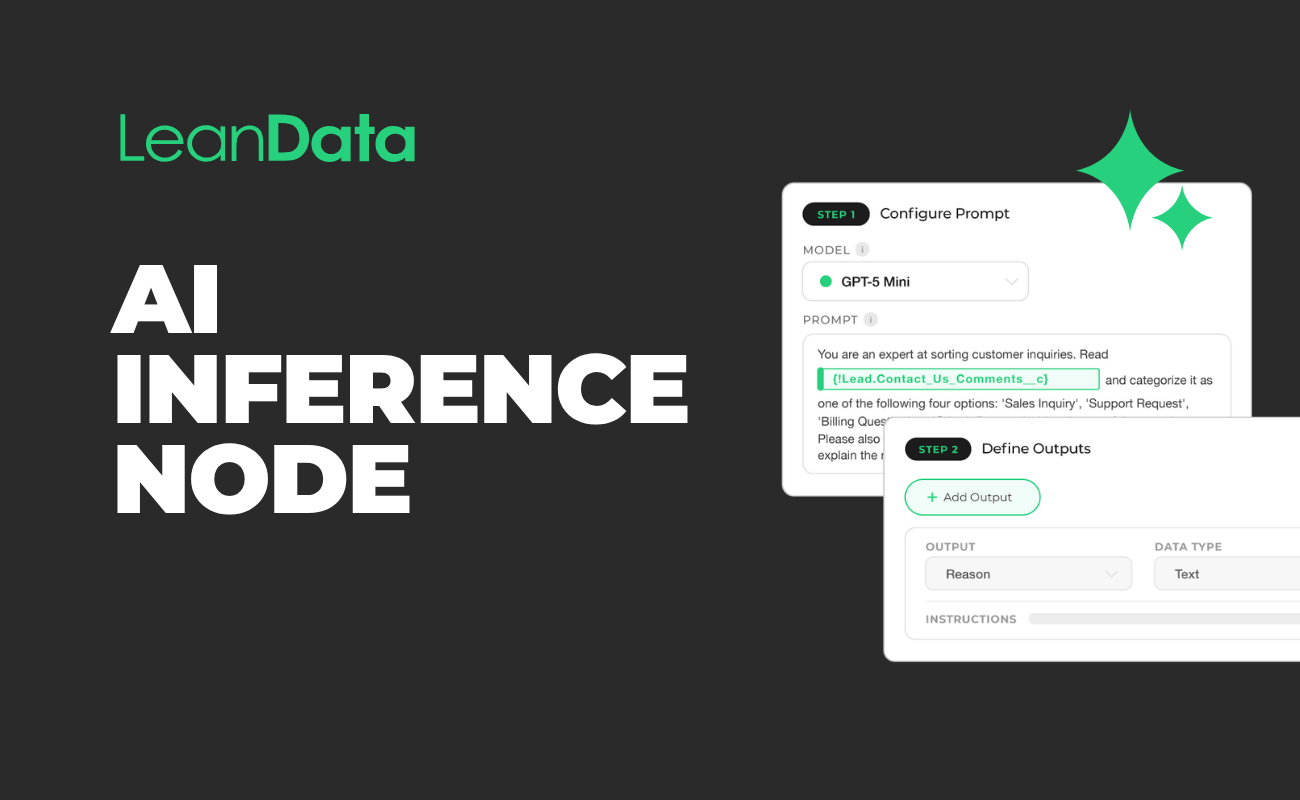
4. Write the Prompt
5. Define Outputs
6. Test and Refine
Set the Exit Paths
WHAT HAPPENS
Connect your own OpenAI or Google Gemini API key under Integrations (LeanData uses a Bring Your Own LLM model)
Turn on the AI Inference Node toggle under Admin > Settings > AI Tools, since it’s disabled by default
Drag the AI Inference Node into a FlowBuilder graph for Lead, Contact, Account, Opportunity, Case, or Any Object Routing
Enter instructions for the AI, referencing record variables directly in the prompt text
Create the variables the AI should return, choosing a data type for each so results save correctly
Run sample records through the node’s built in test tool and adjust the prompt until results are consistent
Route successful responses to the next node, and send timeouts (about 1 minute) or errors, like an invalid key or model refusal, to a fallback path
“One thing I love about the AI Inference Node is you can just build the model and then test it, and it’s going to let you know whether or not it’s working right there.”Linzy Cote
Turn Every Field Into a Routing Signal
Book a demo to see how the LeanData AI Inference Node eliminates manual triage, automates data cleanup, and brings AI-powered reasoning into your GTM workflows natively in FlowBuilder.
FAQ
What is the AI Inference Node?
The AI Inference Node is a native LeanData FlowBuilder node that sends free-text fields from any supported Salesforce object to a large language model and returns a structured output such as a classification, score, or extracted value that drives downstream routing decisions automatically.
What use cases does the AI Inference Node support?
Common use cases include intent categorization (classifying inbound form submissions by type), data normalization (cleaning incomplete or inconsistent field data), lead scoring (synthesizing multiple signals into a priority tier), competitive extraction (identifying competitor names and loss themes from CRM fields), and sentiment analysis (flagging at-risk accounts from renewal or survey feedback).
Do I need to bring my own LLM?
Yes. The AI Inference Node works with OpenAI or Google Gemini via your own API key, giving you full control over the model and cost structure. LeanData provides the configuration interface, prompt builder, output definition, and native integration with your routing graph.
How does this differ from traditional routing conditions?
Traditional routing rules can only evaluate structured field values: a field equals a specific string, number, or picklist option. The AI Inference Node allows you to route on probabilistic reasoning, meaning it can interpret intent, infer context, and extract meaning from unstructured text that no rule-based condition could parse.
Tags
AI GTM
Intelligent Go-to-Market Orchestration
Lead Routing