










Summary
LeanData’s Q2 2026 release gives enterprise revenue teams a unified view of every routing and scheduling decision, smarter rep assignment based on real attributes, and a direct connection between BookIt and any AI tool through BookIt MCP. This article breaks down each new feature and explains what it means for teams managing complex go-to-market workflows in Salesforce.
What You’ll Learn
- What changed in LeanData’s Audit Logs experience, where logs now live, and how long they are retained.
- How the new LeanData AI Assistant works within Audit Logs and what kinds of questions it can answer.
- How Best-Fit Assignment evaluates rep attributes when making a round robin assignment, and how fairness is preserved.
- What the renamed Track SLA node does differently from the previous Hold Until node, including multi-SLA tracking and built-in notifications.
- How Multi-Hierarchy Support works for organizations that maintain more than one view of their account structure.
- How BookIt MCP connects AI tools to scheduling workflows.
AI Is Rewriting the B2B Go-to-Market Playbook
Enterprise go-to-market teams are navigating an entirely new level of complexity.
AI tools are reshaping how GTM teams operate, from AI SDRs booking meetings to large language models reasoning over routing decisions. However, those tools only work reliably when the underlying orchestration layer is governed, accurate, and auditable.
LeanData’s Q2 2026 release addresses these problems directly. The features highlighted in this article span routing intelligence, transparency, SLA governance, account hierarchy management, and AI-native scheduling.
Here is what’s new and what it means for your team.
See Every Routing Decision in One Place
Ask any RevOps admin what takes the longest when a routing dispute lands in their inbox. The answer is almost always the same: piecing together what happened.
Until now, LeanData stored audit logs by object and by product, which meant switching between separate views for leads, contacts, accounts, and BookIt, just to follow one record’s journey.
The new Audit Logs experience changes that:
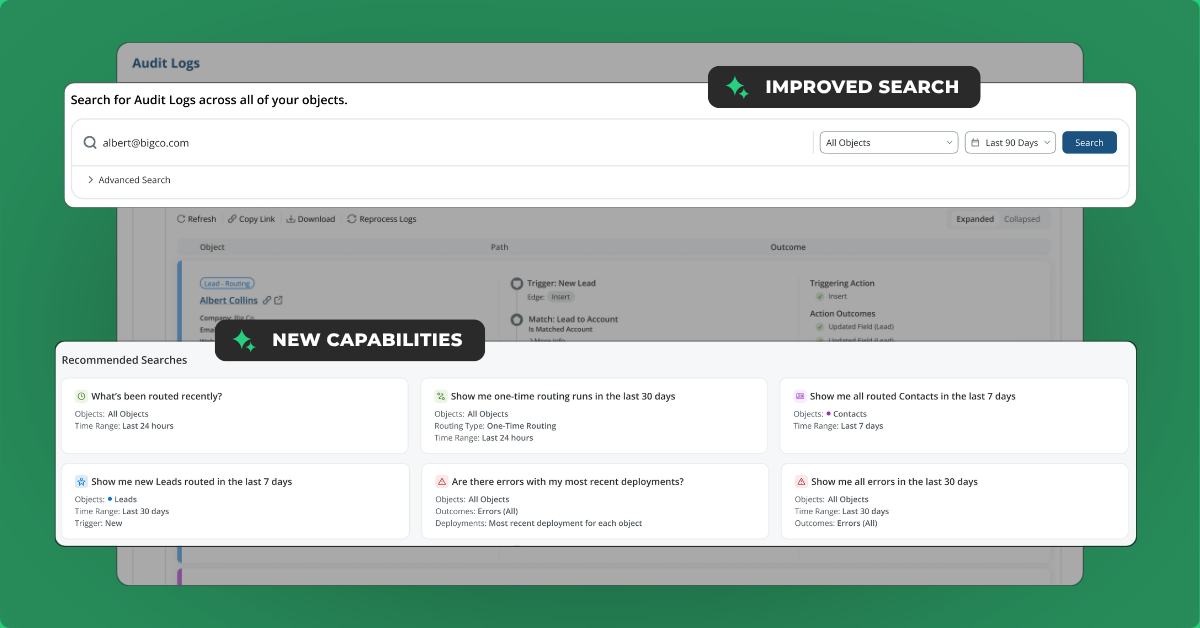
- Every audit log LeanData generates for a record now appears in a single, chronological, searchable view.
- Search by email address or Salesforce ID and see the complete picture across Orchestration and BookIt, across every object, in order.
- Plus, the experience runs on cloud infrastructure, which means search is faster and storage extends to 24 months. (This is especially meaningful for teams whose Salesforce storage costs have grown alongside their data volume.)
- Audit Logs now sync on a 15-minute schedule. A manual sync button is available for admins testing deployments, and the feature is opt-in through a toggle in admin settings.
For enterprise teams managing dozens of routing graphs across multiple products, this is the visibility upgrade that makes everything else easier.
Ask Your Audit Logs a Question
Seeing all the audit logs in one place is just the first step. Understanding what they mean is the second.
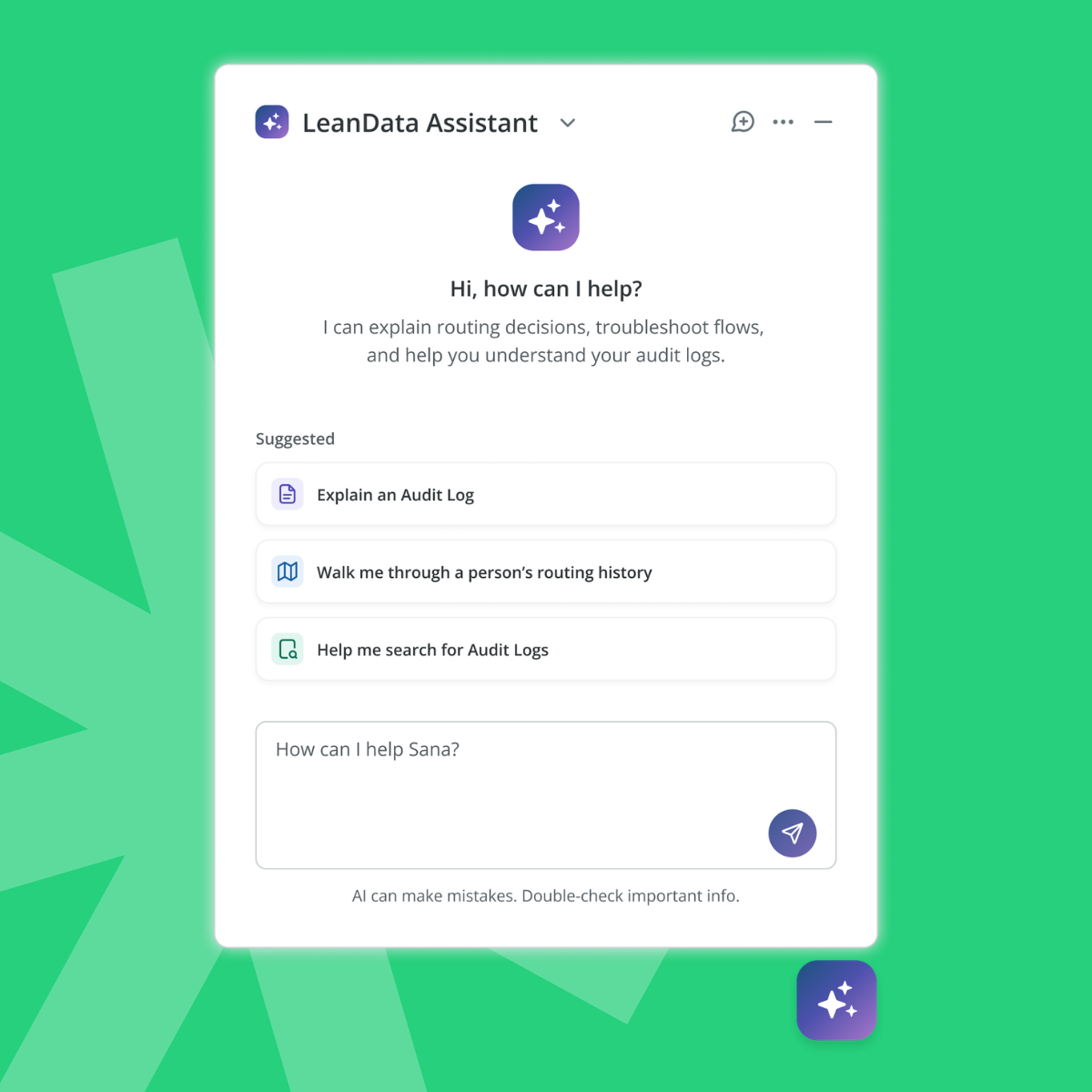
Routing decisions in complex environments are not always easy to read, even for experienced admins. The new LeanData AI Assistant embeds a conversational interface directly into the Audit Logs experience, so admins can ask questions and get immediate, contextual answers.
- Ask “Why was this lead routed to Amy Jones?” and get a plain-language explanation that references the node path taken, the matching logic applied, and the conditions that were evaluated.
- Ask “Summarize this lead’s journey” and receive a coherent narrative stitched together from logs across multiple products and objects.
The assistant understands your graphs, not just your logs. That distinction matters when a routing decision involves several nodes and multiple criteria. Admins can follow up with additional questions in the same conversation, and each answer accounts for the full context of what happened.

Round Robin to the Right Rep, Not Just the Next Rep
Standard round robin distribution treats every lead and every rep the same. It goes down the list in order, assigns the next rep, and moves on. That works for basic fairness, but it leaves value on the table when, for example, a lead from a German-speaking enterprise pharma company lands with a rep who does not speak German and has no life sciences background.
LeanData’s new Best-Fit Assignment changes the calculus. It adds an “Attribute-Aware” mode to the Round Robin node that evaluates rep attributes alongside lead data before making an assignment.
Admins define those attributes by mapping fields from the Salesforce User object into the LeanData platform. Any of the following can inform the match:
- Language spoken
- Product expertise or specialization
- Tenure at the company
- Conversion rate by industry or segment
- Certifications or any other field on the user record
The fairness guardrail stays in place and count-based distribution still governs the baseline assignment. Best-Fit only activates when two or more reps are tied on counts, and at that point, the attribute comparison determines who gets the record.
The result:
- High performers do not get flooded with assignments
- Workload distribution stays balanced across the team
- When it matters, the record goes to the rep most likely to win it
The practical benefit for admins is simpler graphs. Plus, routing logic that previously required separate pools for different regions, languages, or specializations can now live inside a single Round Robin node.

One Node, Multiple SLAs, Full Accountability
A service-level agreement, or SLA, in a routing context is essentially a rule that says: this action needs to happen within a certain amount of time. For example, a new inbound lead should be contacted within four hours, or an opportunity should be updated within two business days.
LeanData’s routing tool has long included a way to enforce these rules and hold records until they are met through the Hold Until Node.
New in the Q2 2026 release, the Hold Until node is now the Track SLA node, and it does significantly more. Here’s what changed:
- A single node can now track multiple SLAs at once. The record stays in the node until every configured condition is met.
- Each condition gets its own time-to-action measurement, all tied to one unified metric for reporting.
- Built-in reminder notifications can fire via email, Slack, or Microsoft Teams, while the record is still being held. No extra nodes required.
- An extended tracking option keeps the record in the node even after an SLA is missed, so teams can measure how long the action actually took, not just whether the deadline was hit.
What used to take multiple nodes now takes one. The simplification shows up immediately, both in how graphs look and in how SLA performance gets measured.
See Accounts the Way Your Business Actually Works
Enterprise organizations do not look at their accounts through a single lens.
✔️ Finance needs a legal hierarchy to understand liability.
✔️ Sales needs a GTM hierarchy built around how territories are structured.
✔️ Customer Success needs a view that rolls up health metrics across all subsidiaries under a parent.
LeanData’s new Multi-Hierarchy Support removes that constraint. Admins can now build and maintain up to 10 distinct hierarchies per org, each sourced from any enrichment provider or combination of providers. D&B, ZoomInfo, Clay, or proprietary data can all feed separate hierarchies that coexist in the platform without conflict.
The Account Hierarchy Match node in FlowBuilder has also been updated to let admins specify which hierarchy to evaluate during routing. This opens a powerful use case: building parallel hierarchies from two different enrichment sources, evaluating them side by side in a single routing pass, and identifying where they diverge.
Teams managing multiple data vendors can use this to clean up conflicting hierarchy data and converge on a single source of truth without a major manual effort.
Connect AI Agents Directly to BookIt MCP
What Is MCP and Why Does It Matter?
Before getting into what this new feature does, it helps to briefly explain what MCP means. MCP stands for Model Context Protocol, which is a standard that lets AI tools like Claude, ChatGPT, or Agentforce connect to external systems and use them as if they were built-in capabilities.
Think of it as a plug-in standard for AI. When a system publishes an MCP server, any compatible AI tool can discover it, connect to it, and use it to take actions or retrieve information.
The Scheduling Gap AI Tools Have Not Been Able to Cross
AI agents are entering enterprise GTM stacks at a fast pace. AI SDRs are qualifying leads and initiating outreach. Agentforce deployments are handling inbound conversations. Internal agents are managing post-sales workflows. All of them eventually need to book a meeting, and most of them lack a reliable way to do it inside enterprise business rules.
BookIt MCP addresses this directly. The BookIt MCP server exposes scheduling functionality through a standard interface that any MCP-compatible AI client can connect to. That includes Claude, ChatGPT, Agentforce, Cursor, and any other tool that supports the protocol.
What Admins and Reps Can Do
Once connected, admins and reps each get their own set of capabilities, all from within whichever AI tool they already use, without opening LeanData or building a report.
Governance Stays Intact
For developers and partners building agentic workflows, BookIt MCP replaces the need for custom API integrations. The protocol exposes a curated set of standardized tools covering availability checks, meeting lookups, booking flows, and pool configuration. Partners building on platforms like Agentforce or 1Mind can connect to it directly.
BookIt remains the system of record. Every action taken through the MCP server respects your routing rules, pool fairness settings, and SLA logic. Governance and auditability are built into the layer itself, not added as an afterthought.
Good AI GTM Starts with What Happens Under the Hood
LeanData’s Q2 2026 release reflects four themes that run through every feature in this update.
#1 Visibility
Unified Audit Logs and the AI Assistant give revenue teams a single place to see and understand every decision LeanData makes, across every product and object, with AI to help interpret what happened.
#2 Precision
Best-Fit Assignment and SLA Enhancements move routing and enforcement from blunt instruments to contextual ones. Records go to the right person, SLAs track the full story, and reporting gets more accurate.
#3 Flexibility for Enterprise Scale
Multi-Hierarchy Support allows ops pros to configure separate hierarchy views for different teams and their needs, and easily switch between hierarchy models based on the task at hand.
#4 AI Go-to-Market Readiness
BookIt MCP makes LeanData the scheduling infrastructure layer for any AI agent operating in your GTM stack, with the governance and deterministic logic that enterprise deployments require.
Whether you lead revenue operations, manage a sales organization, own the Salesforce stack, or set GTM strategy at the executive level, these features were built to reduce the friction your team encounters, improve the buyer experience, and grow more revenue.
FAQ
How does the new cloud-based Audit Logs experience differ from what LeanData has had before?
Can Best-Fit Assignment completely replace the separate pools and decision trees my team currently uses for skills-based routing?
How does the Track SLA node handle records that are already in existing Hold Until nodes when we upgrade?
Which AI tools can connect to BookIt through the MCP server?
See what these new features can do for your AI go-to-market orchestration and scheduling.

Kim Peterson
Kim Peterson is the Senior Manager of Content Strategy at LeanData where she digs deep into all aspects of go-to-market strategy and execution. Kim's writing experiences span tech companies, stunt blogging, education, and the real estate industry. Connect with Kim on LinkedIn.