











Summary
Scheduling software for B2B sales teams automates the process of connecting qualified buyers with the right sales rep. A CRM scheduling integration connects your meeting booking process directly to your CRM so that every scheduling action is informed by CRM data and recorded back to CRM records.
CRM-native scheduling takes this further by running the entire scheduling application inside the CRM itself, with no external database, no middleware, and no sync delays.
This guide explains how the three CRM scheduling architectures work, where bolted-on scheduling tools create operational problems, and what to look for when evaluating CRM scheduling software for enterprise B2B sales teams.
What You’ll Learn
- The three CRM scheduling integration architectures and how each one handles your data
- Why scheduling tools that sync to your CRM create reporting gaps, duplicate records, and audit trail blind spots
- How Salesforce-native scheduling works at the data and workflow level
- What real operations teams report after switching from external scheduling tools to CRM-native scheduling
- Seven questions to ask any scheduling vendor about their CRM integration
Where Your Scheduling Data Lives Matters More Than You Think
Most teams evaluate scheduling software by looking at the calendar experience: how quickly a prospect can pick a time, how clean the booking page looks, whether it supports round robin distribution. Those features matter. But they all happen at the surface.
The question that separates a scheduling tool that works from one that creates new problems is simpler: where does the data go?
When a prospect books a meeting, the scheduling system captures:
- Who they are
- Which rep they were matched to
- What time they selected
- Whether they rescheduled or no-showed
- What routing logic determined the assignment.
That information belongs in your CRM, because your CRM is where pipeline reports, SLA tracking, forecasting, and rep performance dashboards all live.
If the scheduling tool stores that data in its own database first and then syncs it back to the CRM on a delay, you now have two versions of the truth.
And every team that touches pipeline data, from RevOps building reports to sales leadership reviewing forecasts to marketing measuring campaign attribution, is working with information that may already be stale by the time they see it.

This is the core issue with most CRM scheduling integrations: they integrate, but they don’t inhabit. They push and pull data between two systems instead of operating inside one.
Three CRM Scheduling Architectures (And What Each One Means for Your Data)
Not all CRM scheduling integrations are built the same way. The differences show up in how your data moves, where it’s stored, and how much control your operations team has over the full workflow.
CRM Scheduling Architecture Comparison
CRM-Native: The Application Lives Inside Your CRM
A CRM-native scheduling application installs directly into your CRM as a managed package or native app. It reads CRM data in real time, executes scheduling logic using your existing CRM objects, and writes every booking outcome back to CRM records immediately. There is no external database.
For Salesforce environments, this means the scheduling tool operates as a Salesforce-managed application.
It creates its own custom objects within Salesforce, adds fields to standard objects like Lead, Contact, Account, and Opportunity, and runs its processing logic as Apex jobs inside your Salesforce org. When a meeting is booked, the data is already in Salesforce because the booking happened in Salesforce.
The practical impact: your reporting is always current, your audit logs are complete, and your Salesforce admins can manage the scheduling tool using the same permission sets and access controls they use for everything else.
 “LeanData in tandem with BookIt is a one stop shop for routing, data quality, scheduling and more! Everything lives inside of Salesforce as well which makes it easy from an adminstrative perspective in regards to activating and deactivating users, and building your flows. ”
 Nicole Looker


API-Connected: Two Databases Talking to Each Other
Most B2B scheduling tools fall into this category.
The scheduling application runs on the vendor’s infrastructure. It reads some CRM data via API calls (account ownership, territory assignments, lead status), uses that data to make routing decisions in its own system, and then pushes the results back to your CRM through a bidirectional sync.
This works, and for many organizations it works well enough. But the architecture introduces specific risks that grow as your scheduling volume increases.
- API syncs can fail silently.
- Bidirectional syncs can create duplicate records when both systems update the same field within the same sync window.
- Reporting lags behind reality by however long it takes for the sync to complete.
- When something goes wrong with a meeting assignment, your ops team has to troubleshoot across two separate systems to figure out what happened.
Embedded / iFrame: Looks Native, Isn’t Native
Some scheduling tools offer an embedded experience inside Salesforce. The scheduling interface appears within the CRM UI, which makes it feel integrated. But the application still runs on external servers. The data still lives in the vendor’s database. The sync still happens over API.
This matters because the admin experience and the data experience are both external. Troubleshooting requires access to the vendor’s portal. Permission management happens in two places. And the delay between a booking event and its appearance on the CRM record is the same as any other API-connected tool.

Five Operational Problems That Native Scheduling Eliminates
The architecture differences aren’t abstract. They show up in specific, recurring problems that ops teams deal with every week when their scheduling tool lives outside the CRM.
#1 Stale data in pipeline reports
When scheduling data syncs on a delay, even a delay of a few minutes, there’s always a window where CRM records don’t reflect reality. A prospect who booked a meeting five minutes ago still shows as “uncontacted” in the lead queue. A rep who just completed a handoff doesn’t see the confirmed meeting on the account record yet. For teams running speed-to-lead SLAs, this gap makes it impossible to measure response time accurately from within the CRM.
#2 Duplicate records from sync conflicts
Bidirectional syncs between two databases create a classic data integrity risk.
If the scheduling tool creates a record and the CRM creates a record for the same interaction within the same sync window, you end up with duplicates. Ops teams spend hours each week identifying and merging these records, or worse, they don’t catch them and the duplicates pollute reports downstream.
#3 Audit trail gaps
When a meeting gets assigned to the wrong rep, someone has to figure out why. If the routing logic lives in an external tool, the full story of what happened requires logging into the vendor’s admin portal, pulling their audit logs, cross-referencing timestamps with CRM data, and piecing together the sequence.
With CRM-native scheduling, the entire routing decision, from form submission to match to rep assignment to calendar display, is logged inside the CRM where your ops team already works.
#4 Permission complexity
Managing who can do what inside your scheduling tool requires a second admin console when the tool lives outside the CRM. You’re assigning Salesforce profiles and permission sets for CRM access, and then separately managing roles and permissions inside the scheduling vendor’s portal. This adds overhead for IT and creates gaps where someone has the right CRM access but the wrong scheduling permissions, or vice versa.
#5 Workflow fragmentation
The real cost of a non-native scheduling tool isn’t any single problem. It’s the ongoing operational tax of maintaining two systems that need to stay in sync. Every territory change, every new rep added to a round robin pool, every routing rule update has to be reflected in both places. When the scheduling tool sits inside the CRM and uses the same routing engine, that duplication disappears.
How CRM-Native Scheduling Works in Practice
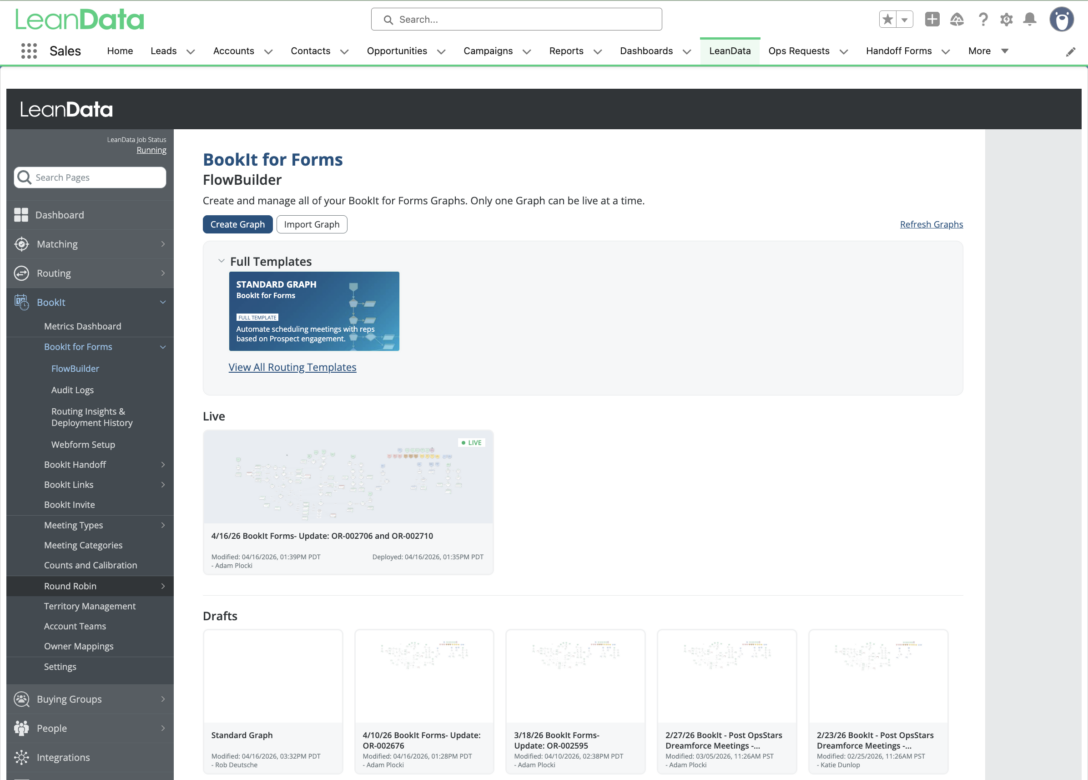
To make the concept concrete, here’s how a CRM-native scheduling platform operates at the data and workflow level, using LeanData BookIt as the example. BookIt is a Salesforce-native application, which means it installs as a managed package directly inside your Salesforce org.
What Happens Under the Hood
When your Salesforce admin installs LeanData, the managed package creates custom objects within Salesforce and adds a small number of fields to standard Salesforce objects (Lead, Contact, Account, Opportunity, and Case).
The application’s processing logic runs as Apex batch jobs inside your Salesforce instance. There is no external database, no middleware layer, and no API sync moving data between two systems.
Here’s what the scheduling flow looks like for an inbound form submission:
- A prospect fills out a demo request form on your website.
- The form data is sent to LeanData’s routing graph (FlowBuilder), which runs inside Salesforce.
- FlowBuilder executes lead-to-account matching using LeanData’s fuzzy matching engine, checking for duplicate leads, existing contacts, and matched accounts. This matching runs at 95% accuracy across CRM objects.
- Based on the match result and your routing rules (territory, account ownership, round robin, segment), FlowBuilder determines which rep should take the meeting.
- BookIt displays that rep’s live calendar on the form’s thank-you page. If you’re using a round robin pool, it shows the earliest available time across all reps in the pool.
- The prospect selects a time. The meeting record writes directly to the Salesforce Event object. The lead record updates. The audit log captures every routing decision made in the process.
The entire sequence happens in seconds. And because every step executes inside Salesforce, there’s nothing to sync afterward. The meeting data is already on the CRM records that your reports, dashboards, and SLA timers reference.
FlowBuilder: Scheduling Logic You Can See and Change
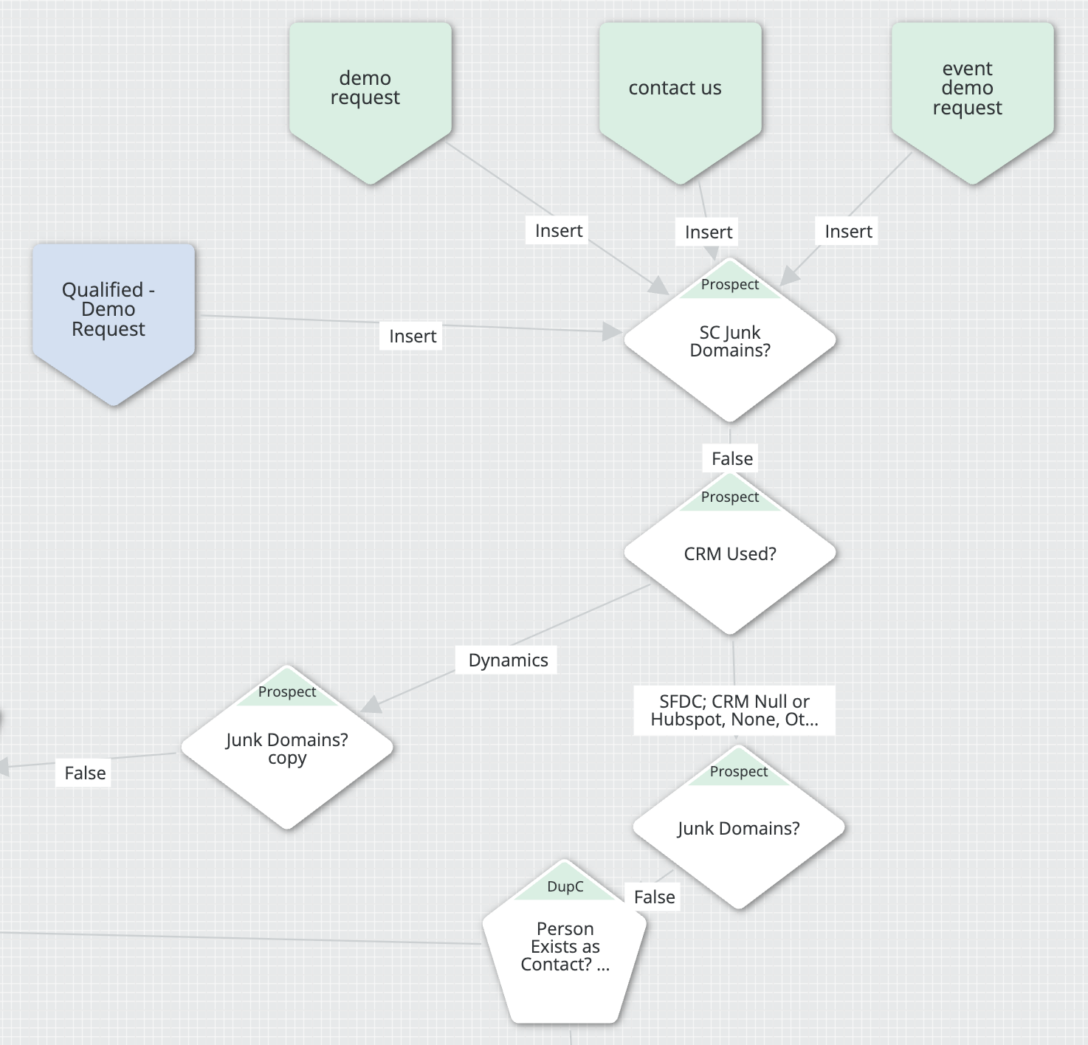
The routing intelligence behind BookIt lives in FlowBuilder, a visual, drag-and-drop workflow builder that runs inside LeanData’s Salesforce application.
Ops teams use it to define how scheduling decisions are made: which leads qualify for instant booking, which segments get routed to SDR pools versus directly to AEs, how existing customer accounts are handled differently from new prospects, and what happens when a rep is unavailable.
FlowBuilder is designed so that RevOps and MOps teams can make changes without writing code and without filing tickets with IT. When territories shift, when a new product line launches, or when the sales team restructures, the scheduling logic can adapt in hours.
Three Products, One Platform
LeanData BookIt includes three scheduling products that cover different stages of the buyer engagement:
BookIt for Forms turns inbound form submissions into instant booking experiences. A prospect submits a demo request, and the right rep’s calendar appears before they leave the page. This product supports web forms, chatbots, and AI SDR tools like Qualified and Agentforce.
BookIt Handoff automates the scheduling of next-step meetings directly from Salesforce Lead, Contact, Account, Opportunity, and Case records. When an SDR wraps a discovery call, they can book the AE follow-up before the prospect hangs up. The system automatically suggests the right host based on territory, account matching, and routing rules.
BookIt Links gives reps personalized booking links for outbound prospecting. Individual, team, group, and round robin links can be shared via email, LinkedIn, sales engagement sequences, or any other channel. A Chrome extension lets reps access their links without switching contexts.
All three products share the same matching engine, routing logic, round robin infrastructure, and audit trail. And all three write data directly to Salesforce.
What Ops Teams Report After Switching to Native Scheduling
The shift from an external scheduling tool to a CRM-native one shows up in both operational metrics and day-to-day admin experience.
In a LeanData survey of BookIt customers, 78% reported saving time on internal administration after switching. Further, 74% said meeting assignment accuracy improved. And 70% reported faster meeting assignment speed. Among survey respondents, 62% saw ROI within weeks or days of implementation.
Before adopting BookIt, 43% of survey respondents were using Chili Piper and 17% were using Calendly.
When asked why they chose BookIt, the top reasons were:
- They were already using LeanData for routing
- They wanted to consolidate their tech stack
- They valued Salesforce-native architecture
- They needed better audit logs and reporting
- They wanted a tool that required less ongoing admin work
“The main reason we selected LeanData BookIt was its advanced automation capabilities combined with seamless integration with our existing Salesforce setup. This powerful combination enables us to streamline our scheduling processes, reduce manual intervention, and significantly improve the efficiency and accuracy of our sales operations.”Sarosh Saiyed
Reviewers on G2 reinforce the pattern. One Director of Sales Development wrote: “I love that LeanData is Salesforce native, which makes it easier for debugging and less likely to have delays and syncing issues.”
A Senior Sales Operations Specialist described it as a “powerful native matching and routing app” and noted that native Salesforce architecture “helps avoid issues that can arise from integration apps.”
These outcomes line up with what the architecture predicts. When scheduling data lives inside the CRM from the start, reporting is accurate by default, audit trails are complete by default, and the operational tax of maintaining a sync between two systems drops to zero.
Seven Questions to Ask Before You Choose a CRM Scheduling Tool
Not every organization needs CRM-native scheduling. If your team books a low volume of meetings and doesn’t rely on CRM data for scheduling decisions, a simpler tool may serve you well.
But if your GTM motion involves complex routing, territory-based assignments, handoffs between teams, or SLA tracking tied to CRM records, the integration architecture matters.
Here are seven questions to ask any scheduling vendor during your evaluation:
- Where does meeting data live? Does the tool store scheduling data in its own database and sync to the CRM, or does it write directly to CRM objects? If it syncs, ask about the sync frequency and what happens during a sync failure.
- Does routing logic reference CRM data in real time? Can the tool pull account ownership, territory assignments, opportunity stage, and other CRM fields at the moment of booking? Or does it rely on a cached copy of CRM data that may be stale?
- Can my Salesforce admin manage the tool using standard CRM permissions? Or does the tool require a separate admin portal with its own role and permission structure?
- What do the audit logs look like? Can I trace a single meeting from form submission through matching, routing, and booking entirely inside the CRM? Or do I need to cross-reference logs from two systems?
- What happens when I change routing rules? If I update a territory assignment or add a rep to a round robin pool, does the scheduling tool pick up that change immediately? Or does it require a separate update in the scheduling platform?
- How does the tool handle existing CRM records? When a prospect submits a form, does the tool match against existing leads, contacts, and accounts in the CRM before routing? How accurate is that matching?
- What is the total admin overhead? Beyond the license cost, how much time will my ops team spend maintaining the integration, troubleshooting sync issues, and managing permissions across two systems?
If the answers to these questions involve phrases like “we sync every few minutes,” “you’ll manage that in our portal,” or “we can set up a Zapier connection,” you’re looking at a bolted-on integration, not a native one. That’s a legitimate architecture choice, but go in with your eyes open about the operational overhead it creates.

The Integration Architecture is the Feature
When operations teams evaluate scheduling software, the feature comparison checklist usually starts with booking page design, round robin logic, and reminder automation. Those capabilities matter. But they all depend on a more fundamental question: does this tool strengthen your CRM as the system of record, or does it create a parallel system that competes with it?
CRM-native scheduling keeps your data, your routing logic, your audit trails, and your admin controls in one place. It eliminates an entire category of operational work, from sync troubleshooting to dual-admin management to report reconciliation, that bolted-on tools create by design.
For enterprise B2B teams running complex GTM motions inside Salesforce, that architectural difference shows up in every speed-to-lead report, every SLA review, and every quarter-end pipeline audit.
LeanData BookIt connects scheduling to the same orchestration platform that handles matching, routing, and workflow automation, all natively inside Salesforce. More than 1,000 B2B companies rely on LeanData to run their most critical GTM workflows with the speed, accuracy, and transparency that modern revenue teams require.
Want to take a look under the hood?
Frequently Asked Questions
What is the difference between CRM-native scheduling and a CRM scheduling integration?
Can AI agents book meetings through a CRM-native scheduling tool?
Does CRM-native scheduling work with marketing automation platforms?
What if we’re not using Salesforce?

Kim Peterson
Kim Peterson is the Senior Manager of Content Strategy at LeanData where she digs deep into all aspects of go-to-market strategy and execution. Kim's writing experiences span tech companies, stunt blogging, education, and the real estate industry. Connect with Kim on LinkedIn.